
About ELC Accessible Beauty Hackathon
Ideating and developing accessible and inclusive solutions for the challenges that people with disabilities face in their beauty experience every day.
My Role
UX Designer
Timeline
4 Weeks, 2023
Team (of Five)
Designers: Jennifer I, Quinn T.
Developers: Serheii T, Albert.
When shopping for beauty products, we usually browse products on either online or physical stores, look up its colors, shades, textures, compare prices, and maybe try out before we decide to buy them.
Unfortunately, that would not be easy for people with blindness and visual impairment.
From a several conversations with people who are from completely blind to have some issues of navigation through due to limitation of their vision, we found out the biggest problem that they encounter, is the lack of accessible product information to make an informed purchasing decision.
Design Challenge
How might we make the search for beauty products more accessible, inclusive, and intuitive for visually impaired people?
Our Solution
Create a web application on a mobile version that allow users to look up information for a specific product by voice command or search barcode.
Colleague recommendations to find podcasts already vetted by those in a similar position using podcasts in a similar way.
Intercast itself could provide suggestions by the
course subject an instructor teaches or their department.



Able to hear the voice response from the students to create that connection that will lead to more natural conversations.
Give simultaneous feedback to multiple students.

Thought Process
1
Research
Research the beauty industry *
User Interview *
Competitive Analysis *
Comparative Analysis
2
Define
Persona *
Problem Statement
HMW Statment
User Flow *
Affinity Mapping
3
Design
Color Scheme *
Logo Design *
Design System
Mid-Fi Wireframe *
Hi-Fi Wireframe *
Prototype
*- I played a key role
What are the Difficulties
Visually Impaired Consumers Face?
Research
Who Needs Help?
According to the World Health Organization (WHO), an estimated 1.3 billion people live with visual impairments worldwide. Despite this large number, people with visual impairment and blindness are struggle to shop for beauty products by themselves. They have to rely on their close friends, families, or shopping assistants at stores to find product information to purchase.
What Difficulties Visually Impaired Are Facing?
After determining who are the users, I researched what are the common difficulties that visually impaired people are facing. One of the biggest concerns is the lack of information provided. Blind and low-vision people are unable to shop independently because the buttons and links aren’t labeled on websites and social media.
To Better Understand Their Pain Points,
Conducting User Interviews is Must
Despite the fact that large groups of people are facing challenges every single day, it is quite tough to find out what specific challenges they are having in their routines.
I decided to conduct the user interviews in order to better understand their pain points of shopping in-store and online and using beauty products and their ways to cope with daily struggles, including dependent assistance, and tech assistance.


Analyze Our Direct Competitors
Podcast :
We first wanted to get a better understanding of how more direct competitors were executing their podcast features, to see if we could use some of these features in Intercast, and potentially improve upon what the competitors offer. We compare three podcast-style lessons app.
Ed-Tech:
Not only compare the companies for podcasts, we compared the Ed-tech companies to see how Intercast will be integrate with learning management system (LMS) as well. We looked Formative and Kaizena which both offer the ability to respond to questions using audio, which Intercast is seeking to implement.


Key Insights From the Direct Competitors
-
Having a transcription for audio will help users to keep track in case they might be lost and it will be helpful to students that can’t hear the recording for accessibility.
-
Being able to save and favorite podcasts based on the rating will be one of the critical features for users to find credible sources quickly.
-
have function for simultaneous feedback for multiple students will allows the teacher to give feedback much more quickly which a function that Intercast might consider to implement.
Define
Meet Professor Gordon
The primary target audiences are the professors that we come up with, Professor Gordon.

Meet Another Persona, Student Kate
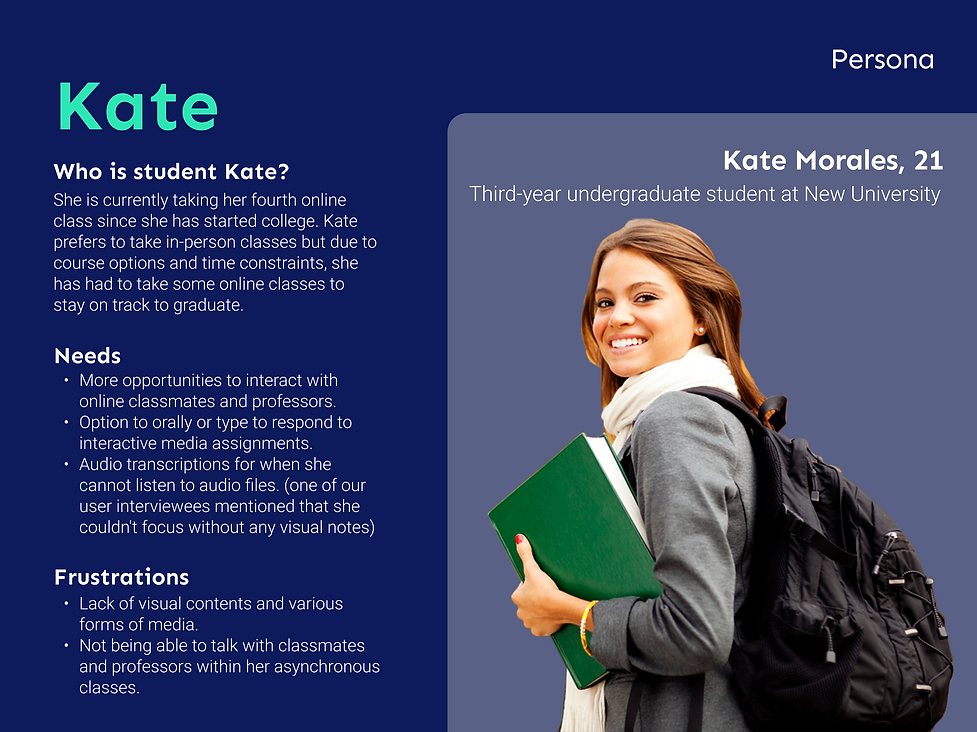
The students will be on the receiving end of the professor’s assignments who are the secondary persona and we develop the persona for the student, Kate.
So, How Can We Help Gordon and Kate?
Now we know the needs and frustrations of Gordon and Kate, we jumped into the scope of the problem and listed out the questions to ask ourselves to solve these.
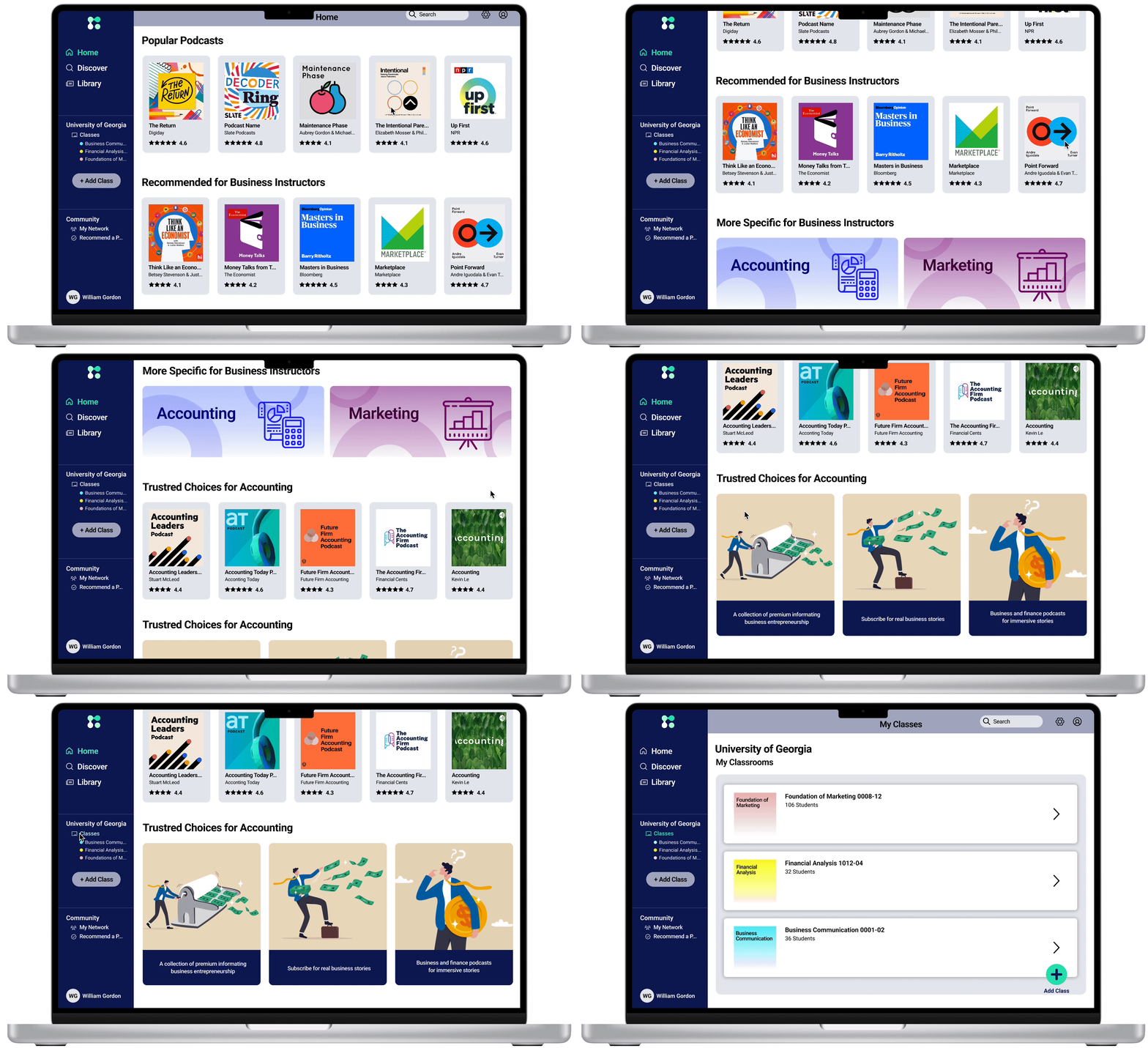
Include features like colleague recommendations to find podcasts already vetted by those in a similar position using podcasts in a similar way.
Provide suggestions by the course subject an instructor teaches or their department, which could possibly make finding podcasts easier.
How might we make the process of searching for podcasts more efficient and accurate?
Make the layout of Intercast similar to the Learning Management System instructors already know how to use in order to avoid excessive time and frustration often associated with learning something new.
Allow instructors to create everything in Intercast and just transfer the assignment over to their learning management system when done, to avoid extra technical difficulties.
How might we make it so professors can easily create assignments using podcasts in Intercast in a simple and engaging way?
How might we create assignments that play to different students’ strengths and abilities?
Give the options of recording their voice or responding with a written response.
Transcriptions for both the podcast and recorded questions and responses could help with accessibility for those who may not be able to hear or respond verbally. Not only that, transcriptions help those who have trouble with the attention that we heard from the user interviews that some are hard to focus on podcasts without having something to look at.
Instructors need a way to easily find podcasts and efficiently create assignments for their online asynchronous classes so that they can increase student engagement and socialization within the remote learning environment.
Creating and Grading Assignments
Having these thoughts, I brainstorm the tasks for the persona, professor Gordon. Professor Gordon is more likely to spend some time creating assignments and grading them on Intercast which creates two different tasks for him.
.png)
.png)
Sketch First
The process below begins with my sketches of initial ideas for wireframes, then gathering all sketches and ideas for wireframes and moving on to the mid-fidelity prototype.


Design
Why Choose the Navy and Mint?
Before moving on the high-fidelity, I like to organized the design system first. The first steps of creating the design system was choosing the color scheme.
I looked through the meaning of colors to provide the feelings and thoughts involved with Intercast. I choose the navy and mint colors to signify confidence and intelligence, and green which can symbolize growth was made to promote these qualities in our users, where they are most important. The variations like navy and mint, which evoke similar feelings, also have a strong contrast to make it easy to see and direct the users' eyes to important elements.


Branding and Logomark
There was nothing branding wise besides the name Intercast.
Our client emphasized the interaction between people and wanted to minimize the use of AI which tries to focus on the interaction and people. Intercast is where students and instructors can come together to have meaningful conversations and mimic the relationships of an in-person classroom. The connected dots represent how Intercast will help build these bridges.


Iteration
We Found 3 Major Issues From Usability Tests
We conducted a total of two rounds of usability tests on professors and college students. Testing some of our wireframes with participants, we quickly gained more insights and lots of feedback.
The most prevalent app issues found from the first round of user testing are:
1. Confusing Recording Process
2. Classroom Layout is Redundant
3. Not Understanding of Emphasis Point


3 Major Design Improvements
According to the major 3 issues that we found from the usability tests, these are three improvements to my design:
1. Recording Process
-
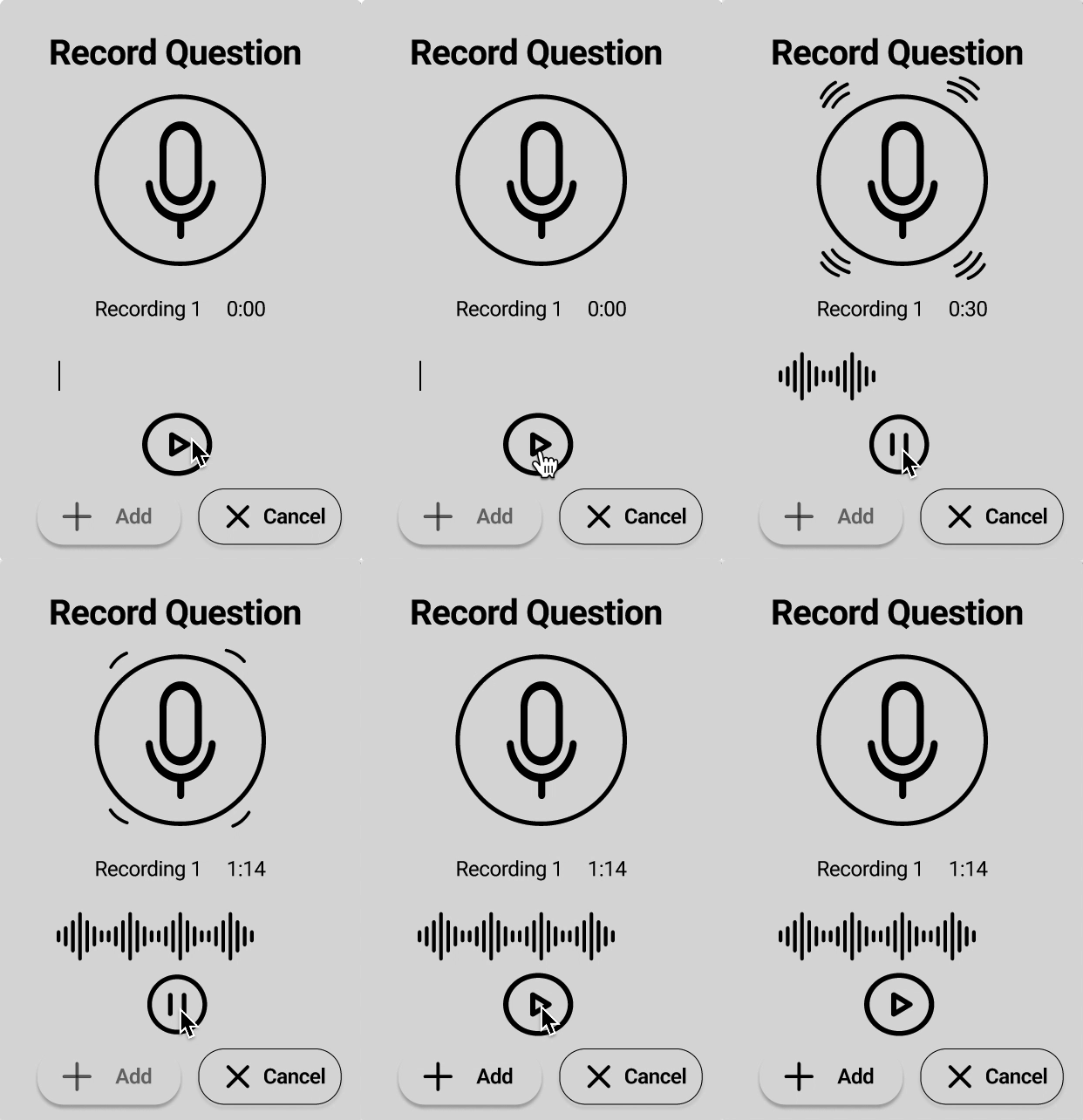
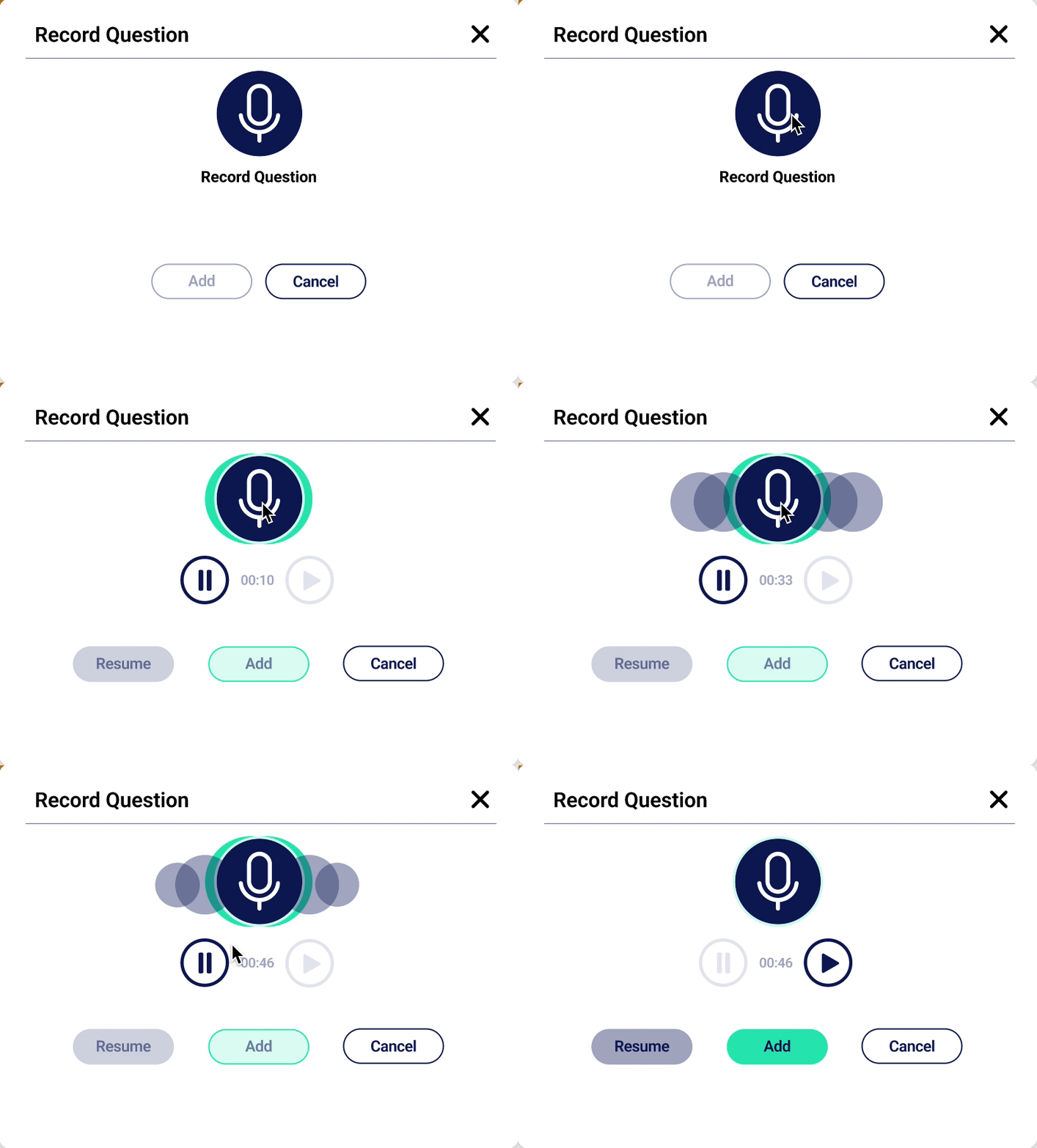
We made the microphone button the functional recording option. The pause button only appears once recording begins and the play is still there but inactive until we have stopped recording.
-
60% of users reported being unsure if they had started their recording. So we wanted to make an animation that made it clear the device was listening. The moving circles indicate that they are recording, following the similar convention of the thin lines that expand and collapse vertically when recording which mimic sound waves.
2. Classroom Layout


-
Some feedback we got from instructors was that most of the learning management systems had all of the same functions like the grading, tasks, and announcements and Intercast is going to be used alongside one which does not need all of these.
-
So in order to help our users avoid overwhelming, we eliminated the task and announcement section and focused on the two major educational functions that can be done within Intercast: grading and creating assignments.
3. Emphasis Point


-
Emphasis points are markers that instructors can place in a podcast assignment that doesn’t necessarily require a question but the professor wants the students to pay extra attention to that information.
-
Many users did not understand the functionality of emphasis points or how to use them. So we added a tooltip that explains what they are and how they can be used when you hover over the small ‘i’ icon.
Testing Out Another Usability Test
We implemented some changes and clear out some of the confusing obstacles to improve the design and functionality and conducted second round of usability testing. During this second round of testing, very minimal errors were made and all tasks were completed successfully.
This time, we performed a system usability scale survey to assess how usable people felt the second version of our design was. After our analysis, Intercasts design scored a 93.1 which falls in the excellent range for its usability.

Feedbacks From the Tests
We also got some really good quantitative and qualitative feedback from users as well.
Quantitative Feedback:
Qualitative Feedback:


Final Product!
I Learned...
It was my first time working with a client and I had so much joy to work with the CEO of Intercast, Raju.
Looking at my next steps, I would like to develop the professor's mobile wireframes and prototypes and students' desktop and mobile wireframes and prototypes. I would also like to design the on boarding process. For example, having a page that asks the professor “which podcasts interest you?“ This will help Intercast generate personalized recommendations right after the login process. Also, a touring system to help introduce innovative and unfamiliar features to professors and students.


